
Finals UI Kit

ESCROW

One interface for your whole server. Try the HUD, menus, interactions and player feedback below—then make them your own.

ox_libqb-targetox_targetchatPausemenuStandalone
Try the live UI preview
Starting from€21.99€15.39
VAT included where applicable
✓Instant Keymaster delivery
✓Secured by Tebex
✓24/7 Discord support
TRY IT BEFORE YOU INSTALL

An interface you can experience.

Click, type and explore. No login required. Gameplay and server actions use sample data.

01 / PLAYER HUD

Your essentials. Your style.

Switch presets and see how player status changes. Health, armor, needs and server information share a consistent accent.

  • Independent HUD and speedometer presets
  • Circle or rounded minimap settings
  • Individual status and information visibility
Loading interactive preview…
02 / VEHICLE DISPLAYS

Every drive, clearly displayed.

Adjust the sample speed and compare the screen display with the holographic interface. The installed hologram is rendered in the game world.

  • Digital, minimal, analog and holographic options
  • Fuel, engine condition, nitro and seatbelt status
  • Aircraft altitude, heading and flight readings
Loading interactive preview…
03 / CONTEXT & LIST MENUS

Every option has its place.

Open a submenu, select an action or change a list value. These are working UI components, with sample actions for the browser.

  • Nested context menus with Back navigation
  • List values, selections and checkboxes
  • ox_lib integration and direct exports
Loading interactive preview…
04 / RADIAL MENU

Quick actions, one gesture away.

Hover over the wheel and choose an action. Move into a submenu or close the wheel from its center.

  • Animated opening and closing
  • Submenus and additional pages
  • Configurable game keybind
Loading interactive preview…
05 / INPUT & CONFIRMATION

Ask clearly. Confirm confidently.

Try form fields, a dropdown and a confirmation dialog. Sample input stays in this browser preview.

  • Required fields and validation
  • Selects, numbers, sliders and other input types
  • Confirmation and cancellation callbacks
Loading interactive preview…
06 / TARGET & WORLD INTERACTIONS

Turn a point into an action.

Select a target option or focus the world preview and hold E to interact with the register. The isolated prompt shows the same component used in the game world.

  • ox_target and qb-target bridges
  • Coordinates, entities, models, bones and offsets
  • Hold actions, eligibility checks and resource cleanup
Loading interactive preview…
07 / PLAYER FEEDBACK

Small details. Clear feedback.

Trigger a notification, run either progress style, inspect a key prompt or start a countdown. Each element can be integrated through exports.

  • Progress bar and progress circle
  • Notifications, separate keycaps and timers
  • Skill check with success and cancellation results
Loading interactive preview…
08 / CHAT

Keep the conversation flowing.

Type a message and press Enter. Explore the chat interface without signing in or sending messages to a server.

  • Message history and command suggestions
  • Standard chat API compatibility
  • Separate chat layout controls
Loading interactive preview…
09 / PAUSE MENU

Give your server a home screen.

Explore the pause menu, character summary and server update feed. Navigation in this preview returns feedback rather than leaving the page.

  • Server branding and configurable links
  • Update cards managed through JSON
  • Optional on-foot poses in-game
Loading interactive preview…
10 / CUSTOMIZATION

Make every detail feel right.

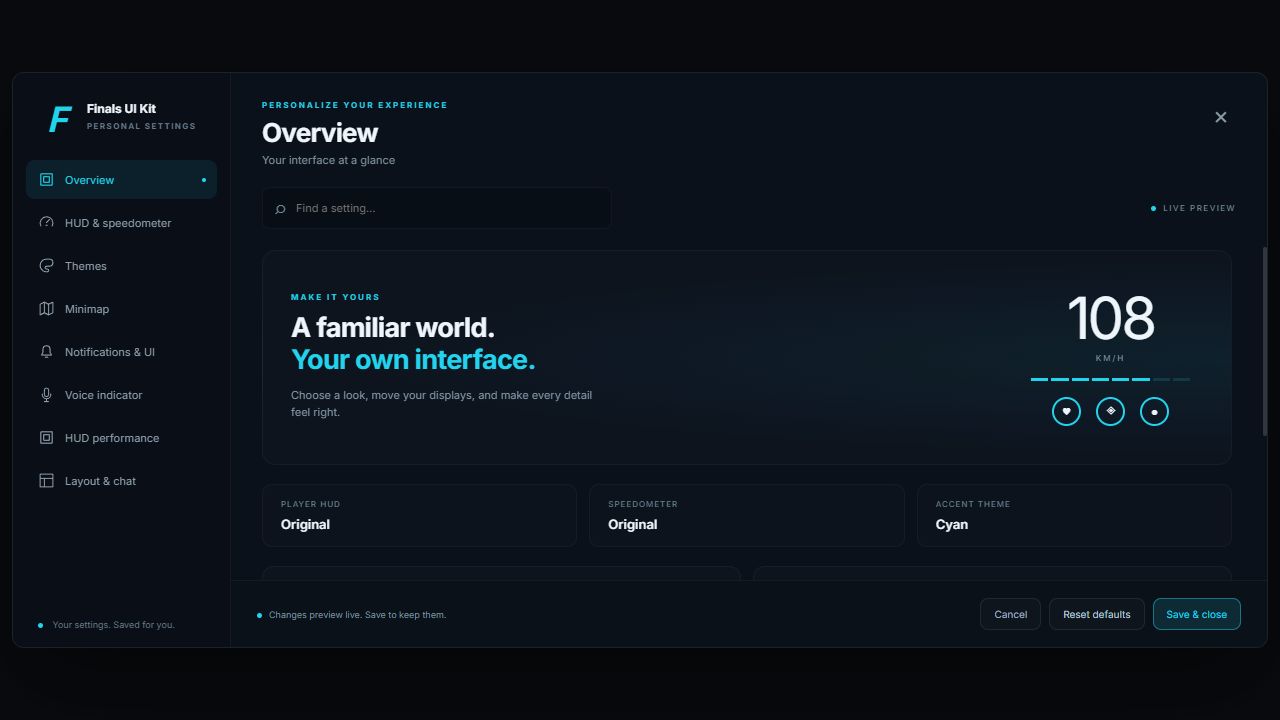
Personalize your server experience through the in-game dashboard. Choose HUD and speedometer presets, themes and permitted layout settings.

  • Live player preferences and layout editing
  • Optional admin-only access and global changes
  • Server-defined limits on player customization
Finals UI Kit customization dashboard with HUD, speedometer, theme and layout settings
INSTALLATION

Ready for your server.

Requires ox_lib. Built-in player-data adapters support Qbox/QBX, QB-Core and ESX. Standalone mode provides native player and vehicle data. Select the integrations you use in config.

ox_target and qb-target are optional integrations. Custom frameworks, fuel providers and seatbelt resources can use the documented adapters.

Includes compiled browser UI. Editable frontend source is not included.

Read the installation guide ↗

Watch trailer

⚡ Instant Escrow Delivery

Ready to deploy to your server?

Add this package to your server now. Assets are deposited automatically into your Cfx.re Keymaster account upon payment.

€21.99€15.39
★ Verified Reviews

What customers say

Read real feedback from server owners running Project Finals scripts in production.

Write a review→
L
Customer
★★★★★

“I Bought Cargo Delivery Job, Simple Job. Very Nice Ui. Easy to Configure & the Best Support”

✓Verified Buyer
Toxmina
Customer
★★★★★

“Finals knows his stuff! We had an issue with the apartment shell and within half an hour he got it working for us. Very helpfull and fast! Keep it up 🙇”

✓Verified Buyer
Fluke
Customer
★★★★★

“I purchased the weapon whitelist script from Project Finals and he did an amazing job from the UI to the script itself there were no errors and his communication was great, will definitely be buying often from them.”

✓Verified Buyer
Brigand
Customer
★★★★★

“This banking plugin is the best I've used. I compared it with Okok's banking system for a long time and finally chose this one. The after-sales support is really responsive. Thanks a lot.”

✓Verified Buyer
Rxne
Customer
★★★★★

“Advanced Rental Script is hands down the best we have tried. Display vehicles spawned in-world look premium and our players love the experience. Support helped us tune config the same day.”

✓Verified Buyer
Kai
Customer
★★★★★

“We moved to the Advanced Billing System for hospital and police fines. Auto-debit works flawlessly and the UI fits our server perfectly. Easy to configure on QBCore.”

✓Verified Buyer
Nova
Customer
★★★★★

“The Advanced Banking Script UI is clean, fast, and escrow setup was painless. Zero errors after install — exactly the quality we expect from Project Finals.”

✓Verified Buyer
Derek
Customer
★★★★★

“Cargo Delivery Job runs smooth even with 80+ players online. The job flow feels natural and the payout balance is actually fair for RP. Worth every euro.”

✓Verified Buyer
Mason
Customer
★★★★★

“Apartment shell + script combo looks insane in-game. Installation guide was clear and Finals jumped on Discord when we had a small MLO offset issue.”

✓Verified Buyer
Zeno
Customer
★★★★★

“Running multiple Project Finals scripts on ESX without conflicts. Everything feels optimized — no random ms spikes after we switched over.”

✓Verified Buyer
Astra
Customer
★★★★★

“Qbox server here — banking, billing, and rental all from Project Finals now. Consistent UI style across scripts makes the whole city feel professional.”

✓Verified Buyer
Viper
Customer
★★★★★

“Weapon whitelist was exactly what we needed for gang RP rules. Simple config, clean NUI, and it just works with ox_inventory on our stack.”

✓Verified Buyer
Cole
Customer
★★★★★

“Police fines through Advanced Billing save our staff so much time. Invoices look legit and players actually pay because auto-debit is seamless.”

✓Verified Buyer
Jinx
Customer
★★★★★

“Rental locations feel alive with the display cars. Players finally understand the system without asking staff every five minutes. Huge W.”

✓Verified Buyer
Rhett
Customer
★★★★★

“Banking ATMs and transfers feel modern — not like the old clunky menus we had before. Our economy team loves the backend flexibility.”

✓Verified Buyer
Sora
Customer
★★★★★

“Standalone install on a custom framework was surprisingly easy. Good exports, readable code structure, and fast replies when we asked questions.”

✓Verified Buyer
Blaze
Customer
★★★★★

“Third purchase from Project Finals this month. Reliable updates, no broken dependencies after Tebex downloads, and support that actually fixes things.”

✓Verified Buyer